
Internet Speed for IPTV: How Much Do You Need for 4K, FHD & HD?
Choosing the right internet speed for IPTV can make the difference between smooth streaming and constant buffering.
IPTV delivers television and video content through an internet connection, which means the quality and stability of your network play an important role in your viewing experience.
But how many Mbps do you actually need for IPTV? Is 20 Mbps enough? What about 4K streaming? And is Wi-Fi good enough, or should you use Ethernet?
In this guide, we explain the recommended internet speed for IPTV across SD, HD, Full HD and 4K streaming, as well as the other network factors that affect IPTV performance.
If you are new to IPTV, first read our What Is IPTV? How IPTV Works Guide. You can also compare internet television with traditional television in our IPTV vs Cable TV Guide.
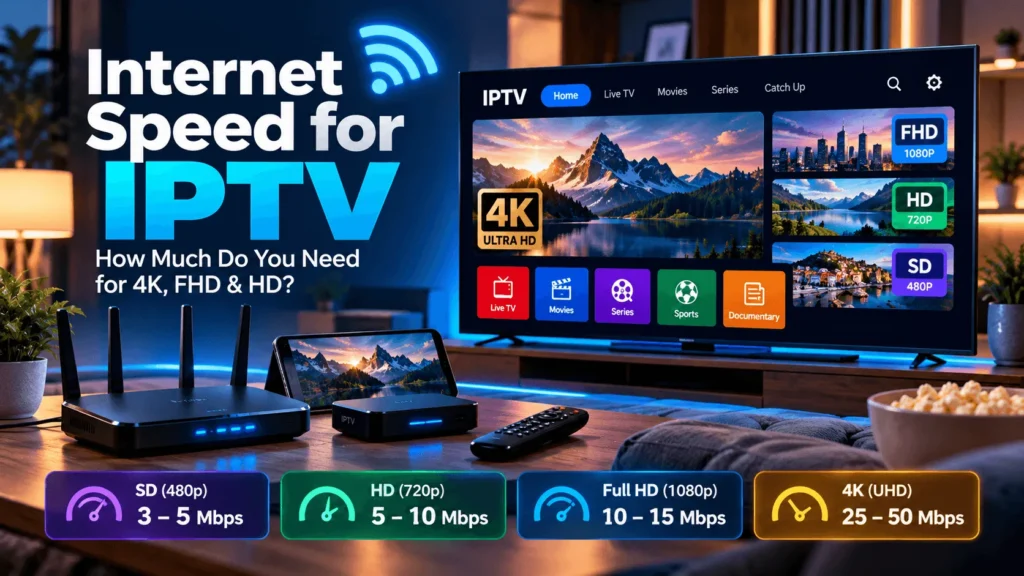
How Much Internet Speed for IPTV Do You Need?
There is no single speed requirement that applies to every IPTV stream.
Bandwidth depends on several factors, including video resolution, compression method, bitrate, device, provider and network conditions.
As useful benchmarks, Netflix currently recommends a stable connection of at least 3 Mbps for 720p HD, 5 Mbps for 1080p Full HD and 15 Mbps for 4K Ultra HD. YouTube recommends approximately 2.5 Mbps for 720p, 5 Mbps for 1080p and 20 Mbps for 4K UHD.
Because IPTV streams vary in bitrate and quality, it is sensible to keep additional bandwidth available rather than planning around the absolute minimum.
A practical home-network guideline is:
| Video Quality | Practical connection target |
|---|---|
| SD 480p | 3–5 Mbps |
| HD 720p | 5–10 Mbps |
| Full HD 1080p | 10–15 Mbps |
| 4K UHD | 25–50 Mbps |
| Multiple IPTV devices | Add bandwidth for each simultaneous stream |
These are practical targets rather than universal IPTV specifications. Actual requirements depend on the stream and service being used.
Internet Speed for IPTV in HD
For HD IPTV, a stable connection is more important than chasing the highest possible speed-test number.
YouTube lists approximately 2.5 Mbps as its sustained recommendation for 720p video, while Netflix recommends 3 Mbps or higher for HD 720p.
For IPTV, allowing around 5–10 Mbps per HD stream provides useful extra capacity for network fluctuations and other devices using the connection.
For example, if someone is watching IPTV while another person is browsing, gaming or downloading files, the total home bandwidth requirement will be higher.
Internet Speed for IPTV in Full HD 1080p
Full HD contains more visual information than 720p and generally requires more bandwidth.
Both Netflix and YouTube currently use approximately 5 Mbps as a reference point for 1080p streaming.
However, this does not mean that a 5 Mbps broadband package is ideal for every IPTV setup.
A connection of around 10–15 Mbps available to the streaming device gives more room for bitrate changes, background traffic and temporary network congestion.
When planning internet speed for IPTV, remember that your advertised broadband speed is shared across the household.
Internet Speed for 4K IPTV
4K streaming requires considerably more bandwidth than HD.
Netflix recommends a stable connection of 15 Mbps or higher for Ultra HD 4K, while YouTube lists approximately 20 Mbps for 4K UHD playback.
For a household using 4K IPTV, having around 25–50 Mbps of available bandwidth provides useful headroom.
This becomes especially important when other devices are simultaneously using the same internet connection.
A fast connection alone does not guarantee 4K quality. The IPTV stream itself must be available in 4K, and your television, streaming player and application must also support the required format.
Is 20 Mbps Enough for IPTV?
For one HD or Full HD stream, 20 Mbps can be sufficient when the connection is stable and other devices are not consuming large amounts of bandwidth.
For a 4K stream, 20 Mbps may be around the lower end of the requirements used by major streaming platforms.
YouTube, for example, recommends approximately 20 Mbps sustained bandwidth for 4K video.
If several people are using your internet connection simultaneously, a faster plan provides more headroom.
Is 50 Mbps Enough for IPTV?
For many households, 50 Mbps provides comfortable capacity for one IPTV stream and additional everyday internet use.
It may also support 4K streaming when the connection remains stable.
But bandwidth is shared.
For example, two simultaneous 4K streams, a game download and several smartphones can use considerably more bandwidth than one television.
This is why calculating internet speed for IPTV should consider the entire household rather than only the television.
Is 100 Mbps Good for IPTV?
A 100 Mbps broadband connection should provide substantial capacity for typical HD, Full HD and 4K streaming when the connection is performing correctly.
It can also provide additional bandwidth for several connected devices.
However, having a 100 Mbps internet plan does not automatically eliminate IPTV buffering.
Wi-Fi interference, poor router placement, overloaded devices, provider-side issues and network congestion can still affect streaming.
Bandwidth is only one part of IPTV performance.
Why IPTV Can Buffer Even With Fast Internet
One of the most common misunderstandings is assuming that buffering automatically means the internet package is too slow.
Someone might have a 100 Mbps or even faster connection and still experience interruptions.
Possible reasons include:
- weak Wi-Fi signal;
- network congestion;
- several devices using bandwidth simultaneously;
- excessive distance from the router;
- router performance;
- device limitations;
- temporary ISP congestion;
- problems with the video source or delivery server.
YouTube similarly advises users experiencing playback problems to test their connection and notes that multiple devices on the same network can reduce the bandwidth available to the streaming device.
So when diagnosing internet speed for IPTV, test more than just the headline Mbps number.
Wi-Fi vs Ethernet for IPTV
Wi-Fi is convenient and can work perfectly well for IPTV, particularly with a modern router and strong signal.
However, Ethernet has several advantages for stationary devices such as Smart TVs and streaming boxes.
A wired connection avoids much of the wireless interference caused by distance, walls, neighbouring networks and other wireless devices.
YouTube’s official guidance also notes that using a wired internet connection instead of wireless can help streaming performance.
For this reason, when Ethernet is practical, it is usually a strong choice for a television or IPTV streaming device.
2.4 GHz vs 5 GHz Wi-Fi for IPTV
Many modern routers provide both 2.4 GHz and 5 GHz Wi-Fi.
The 2.4 GHz band generally offers greater range but is often more congested.
The 5 GHz band can provide higher performance over shorter distances.
For IPTV, 5 GHz can be useful when the television or streaming device is relatively close to the router.
If the television is far from the router or separated by several walls, performance may vary.
The best option depends on your home layout and router.
Why Connection Stability Matters
A stable 30 Mbps connection can sometimes provide a better streaming experience than an unstable connection that repeatedly jumps between much higher and lower speeds.
Streaming technologies can adapt video quality according to changing network conditions.
Apple’s HTTP Live Streaming technology, for example, supports multiple stream bitrates and can switch between them as available bandwidth changes.
This explains why video quality may occasionally decrease rather than playback stopping completely when network performance drops.
What Is Adaptive Bitrate Streaming?
Adaptive bitrate streaming allows a streaming system to provide several versions of the same video at different quality levels.
The player can select a suitable version according to available bandwidth.
When the connection improves, quality can increase.
When bandwidth decreases, the player can switch to a lower bitrate to reduce interruptions.
Apple describes HLS as dynamically adapting to network conditions and switching streams in response to bandwidth changes.
This technology is widely relevant to understanding modern internet video.
How Multiple Devices Affect IPTV Speed
Suppose your household has a 50 Mbps internet connection.
If only one television is streaming Full HD video, there may be plenty of available bandwidth.
But imagine that at the same time:
- another television is streaming 4K;
- a computer is downloading a large game;
- several smartphones are watching videos;
- cloud backups are running.
All these activities share the same internet connection.
Therefore, the recommended internet speed for IPTV increases when multiple users stream simultaneously.
How to Test Your Internet Speed Before Using IPTV
Before changing your internet plan, run a speed test from the same network and preferably close to the IPTV device.
Test more than once.
Network performance can vary throughout the day, particularly during busy periods.
Netflix recommends Fast.com as one method for checking connection speed.
Compare the result with the video quality you want to watch.
If the television receives much lower speeds than another device located next to the router, Wi-Fi coverage may be the problem rather than the internet package.
Download Speed vs Upload Speed for IPTV
For watching IPTV, download speed is generally the more important measurement.
Your device is primarily receiving video data from the network.
Upload speed becomes more relevant when sending data, such as uploading large files or broadcasting video from your own device.
When checking internet speed for IPTV, therefore, pay particular attention to sustained download performance.
Does Ping Matter for IPTV?
Ping measures network latency.
Extremely high or unstable latency can indicate poor network conditions, but IPTV video streaming is generally more dependent on consistent bandwidth and reliable data delivery than ultra-low gaming-style latency.
So a household should not choose an internet package for IPTV based only on the lowest possible ping.
Bandwidth stability remains extremely important.
How to Improve IPTV Streaming Performance
If your speed test appears adequate but IPTV still buffers, start with basic network troubleshooting.
Restart the router and streaming device.
If possible, test Ethernet.
Move Wi-Fi devices closer to the router.
Pause large downloads.
Disconnect unnecessary bandwidth-heavy devices temporarily.
Compare performance at different times of day.
You can also test another legitimate streaming service. If several streaming platforms suffer from similar problems, that strongly suggests the local network or internet connection deserves attention.
How Much Internet Speed for Two IPTV Devices?
Two simultaneous streams require more bandwidth than one.
For example, if each Full HD stream needs roughly 10 Mbps of comfortable available capacity, two devices could benefit from around 20 Mbps or more available bandwidth.
For two simultaneous 4K streams, considerably more capacity is advisable.
Again, these are practical planning guidelines rather than fixed technical requirements because different video streams use different bitrates.
How Much Internet Speed for IPTV on Smart TV?
A Smart TV does not inherently require more bandwidth than another device playing the same stream.
What matters is the video resolution, bitrate and network connection.
However, televisions are often located farther from routers than smartphones or laptops.
Therefore, Wi-Fi signal quality can become an important consideration.
For a permanently installed Smart TV, Ethernet is worth considering whenever practical.
IPTV Internet Speed for Fire TV and Android TV
Streaming devices use the same basic network principles.
An Android TV device or Fire TV device receiving a Full HD stream requires enough stable bandwidth for that particular stream.
The device’s Wi-Fi hardware, router compatibility and location can also influence performance.
If your streaming box has Ethernet capability, wired connectivity can be useful for troubleshooting inconsistent Wi-Fi.
For installation instructions, see our IPTV Installation Guide.
Internet Speed for IPTV: Quick Recommendations
For easy reference:
SD: around 3–5 Mbps available per stream.
HD 720p: around 5–10 Mbps.
Full HD 1080p: around 10–15 Mbps.
4K UHD: around 25–50 Mbps provides useful headroom.
Multiple devices: calculate the combined demand of simultaneous streams and leave additional capacity for normal household internet use.
These are deliberately conservative practical recommendations and should not be confused with fixed requirements for every provider.
Frequently Asked Questions About Internet Speed for IPTV
What internet speed for IPTV is recommended?
For comfortable streaming, around 5–10 Mbps for HD, 10–15 Mbps for Full HD and 25 Mbps or more for 4K provides useful headroom. Exact requirements vary according to stream bitrate and network conditions.
Is 10 Mbps enough for IPTV?
It can be enough for a single HD or some Full HD streams, provided the connection is stable and other devices are not using significant bandwidth.
Is 20 Mbps enough for 4K IPTV?
Some 4K streaming services operate around this range. YouTube currently lists approximately 20 Mbps as its recommended sustained speed for 4K UHD, while Netflix recommends 15 Mbps or higher. More available bandwidth can provide additional headroom.
Is 50 Mbps good for IPTV?
Yes, a stable 50 Mbps connection can provide plenty of capacity for common IPTV use, although multiple simultaneous 4K streams and heavy household internet usage can increase requirements.
Is Ethernet better than Wi-Fi for IPTV?
Ethernet can provide a more consistent connection for stationary devices because it avoids many common Wi-Fi interference and signal problems.
Why does IPTV buffer when my internet is fast?
Buffering can result from Wi-Fi problems, congestion, device limitations, server issues or other network conditions. Your maximum broadband speed is only one factor.
Does 4K IPTV require faster internet?
Yes. 4K video generally uses more data and bandwidth than HD or Full HD video.
Final Thoughts
Choosing the correct internet speed for IPTV is not simply about buying the fastest internet package available.
For smooth IPTV streaming, you need enough bandwidth for the desired resolution, but connection stability, Wi-Fi quality, router performance and simultaneous household usage are equally important.
HD streaming can work comfortably on relatively modest connections, while Full HD and especially 4K require more available bandwidth.
If buffering continues despite having sufficient internet speed for IPTV, investigate your local network before automatically upgrading your broadband package.
For more information, read our What Is IPTV? Complete Guide, compare IPTV vs Cable TV, or follow our IPTV Installation Guide.
________________________________________________________
Sources, reviewed October 2026:
Netflix Help Center, Netflix-recommended internet speeds
Netflix Internet Speed Recommendations
YouTube Help, System requirements and supported devices
YouTube Recommended Streaming Speeds
Apple Developer, HTTP Live Streaming
Apple HLS Documentation